
Storing favorites
Up to 30 favorites can be stored in the favorites list. Available favorites are artist, track, game, league and team.
Storing the artist, track or gameIt is only possible to store favorites that are currently being broadcast. The channel information must be available.
1. "Radio"
2. "Satellite radio"
3. Select "All channels" or the desired category.
4. Select the desired channel.
5. Press the controller again.
6. Select the artist, track or game.
Leagues or teams can be added to the favorites from a selection list.
1. "Radio"
2. "Satellite radio"
3.  "Manage favorites"
4. "Add sports information"
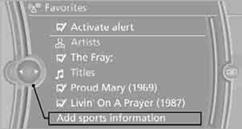
5. Select the desired league.
6. Select "Add all teams" or a desired team.
See also:
My Info
Selecting additional functions
Additional functions are available when a message
is selected:
...
Vehicle equipment
All standard, country-specific and optional
equipment that is offered in the model series is
described in this chapter. Therefore, equipment
is also described that is not available in a vehicle, ...
Closing
Recessed grips in the interior trim of the trunk
lid make it easier to pull down the lid.
Danger of pinching
Make sure that the closing path of the
trunk lid is clear; otherwise, injuries may ...