
Timeshift
Approx. one hour of the program being broadcast on the channel currently being listened to is stored in a buffer. Prerequisite: the signal must be available.
The stored audio track can be played with a delay following the live broadcast. When the buffer is full, the older tracks are overwritten. The buffer is cleared when a new channel is selected.
Opening the timeshift function1. "Radio"
2. "Satellite radio"
3.  "Replay Time shift"
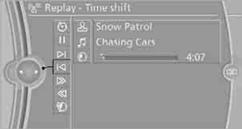
> The red arrow shows the current playback position.
> The time difference to the live broadcast is displayed next to the buffer bar.
> With a live broadcast: "live".
Timeshift menu
Automatic TimeshiftWith the function activated, the audio playback is automatically stopped when:
> There are incoming and outgoing phone calls.
> The voice activation system is activated.
> Muting function is activated.
The audio playback continues after a time delay.
Activating
1. "Radio"
2. "Satellite radio"
3. "Replay Time shift"
4.  "Automatic time shift"
Deactivating
 "Automatic time shift"
See also:
Display
1 Lane departure warning
2 Active Cruise Control
3 Desired speed
4 Navigation system
5 Speed
The collision warning, Night Vision pedestrian
warning, or Check Control messages are displayed
...
Storing
1. Switch on the ignition.
2. Set the desired position.
3. Press the button. The LED in
the
button lights up.
4. Press the desired button 1 or
2. The LED
goes out.
If the M button is pre ...
Message from the Concierge service
Starting destination guidance
1. Select the desired message
2. "Start
guidance" or "Add as another
destination"
Message from the Concierge service
3. Start destination g ...