
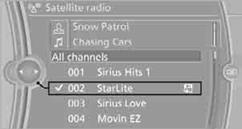
Selecting a channel
You can only listen to enabled channels.
The selected channel is stored for the remote control currently in use.
Via iDrive1. "Radio"
2. "Satellite radio"
3. Select "All channels" or the desired category.
4. Select the desired channel.
Via the button in the area of the CD/ DVD player
Press the  button for the corresponding direction.
The next channel is selected.
Via direct channel entry1. "Radio"
2. "Satellite radio"
3.  "Set channel"
4. Turn the controller until the desired channel is reached and press the
controller.
See also:
Settings for the map view
The settings are stored for the remote control
currently in use.
1. "Navigation"
2. "Map"
3. Open "Options".
4. "Settings"
Set the map view.
► &q ...
Detection
Detection is carried out by two cameras
integrated into the exterior mirror and the rear
view camera.
The range is:
▷ Approx. 7 ft/2 m to the side.
▷ Approx. 7 ft/2 m to the rear.
...
Phone book
Displays
The phone book accesses the contacts and
shows all contacts for which a phone number
has been stored. The entries can be selected to
make a call.
1. "Telephone"
2. "Ph ...