
Controls
The audio and video sources can be controlled using the:
> Buttons near the CD/DVD player
> iDrive
> Buttons on the steering wheel,
> Programmable memory keys,
> Voice activation system
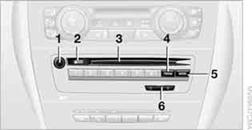
1. Sound output for entertainment on/off, volume
> Press: switch on/off
When you switch on the unit, the last set radio station or track is played.
> Turn: adjusting the volume
2.  Eject the CD/DVD
3. CD/DVD drive
4. FM / AM: change the radio station waveband
5. MODE: change the audio and video sources
6.  Station scan/track search
> Change the radio station
> Select the track for the CD/DVD player, CD changer and certain multimedia devices
See also:
Messages
General informationThe displaying of text messages and emailsfrom the mobile phone depends
on whether the mobile phone supports transmission into the vehicle from the mobile
phone. Text messages a ...
General information
Two different driver's seat and exterior mirror
positions can be stored and retrieved for each
remote control. Settings for the backrest width
and lumbar support are not stored in memory. ...
Opening the tone settings inthe Options menu
1. "CD/Multimedia" or "Radio"
2. If necessary, select additional entries, for example,
"FM" or "CD/DVD".
3. Open "Options".
4. "Tone"
5 ...