
Last destinations
The last destinations are stored automatically. These destinations can be called up and used as a destination for destination guidance.
Opening the last destinations1. "Navigation"
2. "Last destinations"
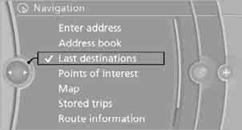
3. Select the destination.
4. "Start guidance" or "Add as another destination"
Destinations can be edited, for example, to change the house number of an existing entry.
3. Highlight the destination.
4. Open "Options".
5. "Edit destination"
1. "Navigation"
2. "Last destinations"
3. Highlight the destination.
4. Open "Options".
5. "Delete entry" or "Delete all last destinations".
See also:
TeleService
General information
TeleService supports communication with your
service center.
▷ Data on the vehicle's service requirements
can be sent directly to the service center. In
this way, the ...
Activating ECO PRO
Press button repeatedly until
ECO PRO
is displayed in the instrument cluster. ...
With the Professional navigation system: Split screen
General informationAdditional information, e.g. from the computer, can be displayed on the right
side of the split screen.
This information remains visible on the split screen even when you change ...