
Entering a destination manually
To make it easier to enter town/city names and street names, the system assists you with automatic name completion and entry comparison. This makes it possible to enter different spellings and completes your entry automatically so that stored town/city names and street names can be accessed quickly.
1. Press the  button.
2. "Navigation"
3. "Enter address"

The system also supports you with the following features:
> If you do not enter a street, the system will guide you to the downtown area
of a town or city.
> You can skip the entry of state/province and town/city if the current entries
should be retained for your new destination.
1. "Navigation"
2. "Enter address"
3. Select "State/Province" or displayed country.
1. Select "Town/City/Postal Code" or the displayed town/city.
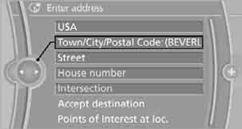
2. Select letters, if necessary.
The list is reduced in steps with each entry.
To delete letters:
> To delete individual letters:
Turn the controller to select  , and then press
the controller.
, and then press
the controller.
> To delete all letters:
Turn the controller to select  , and then press
the controller for an extended period.
, and then press
the controller for an extended period.
To enter spaces:
> Select the  symbol.
The list gradually grows smaller each time you enter a new letter.
3. Move the controller to the right.
4. Select the name of the town/city from the list.
If there are several towns/cities with the same name:
1. Change to the list of town/city names.
2. Highlight the town/city.
3. Select the town/city.
1. Select "Town/City/Postal Code" or displayed city.
2. Select the  symbol.
3. Select the digits.
4. Change to the list of postal codes and towns/cities.
5. Highlight the entry.
6. Select an entry.
1. Select "Street" or displayed street.
2. Enter the street and cross-street the same way you entered the town/city.
After you enter the street, you can also enter the cross street or the house number.
If there are several streets with the same name:
1. Change to the list of street names.
2. Highlight street.
3. Select the street.
Alternative: entering street and house number
1. Select "Street" or displayed street.
2. Enter the street the same way you entered the town/city.
3. "House number"
4. Select the digits.
5. Change to the list of house numbers.
6. Select a house number or range of house numbers.
No such street at the destination
The desired street is not in the entered town/ city because it belongs to another district of the town/city.
1. "Navigation"
2. "Enter address"
3. Select "Street" or displayed street.
4. Change to the list of street names.
5. Select "In" displayed country.
All streets of the entered country are offered. The corresponding town/city is displayed after the street name.
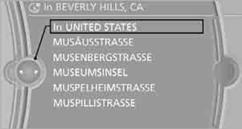
6. Select the letters.
7. Change to the list of street names.
8. Highlight street.
9. Select the street.
Starting destination guidance after entering the destination
1. "Accept destination"
2. "Start guidance" or "Add as another destination".
> Setting "Route preference".
> Search for "Points of Interest at loc.".
See also:
Loss of the remote controls
Lost remote controls can be blocked by your
service center. ...
A-Z search
1. "A-Z search"
2. "Town/City"
3. Select or enter the town/city.
4. "Category"
5. Select the category.
6. "Category details"
For some special destinations ...
Camera
The camera is located near the base of the mirror.
Keep windshield clean and clear in the area in
front of the interior rear view mirror. ...