
Navigation data
General information
Navigation data and authorization codes are available from your BMW center. Navigation data are stored in the vehicle and can be updated.
> Depending on the data volume, a data update may take several hours.
> Update data while driving to reduce the drain on the battery.
> Only the main functions of the navigation system are available during updating.
The update is resumed automatically when a trip is continued after an interruption.
> You can inquire as to the status of the update.
> The data are stored in the vehicle.
> After the update, the system restarts.
> The medium that holds the navigation data can be removed after the update is completed.
1. "Navigation"
2. Open "Options".
3. "Navigation system version":
Information about the data version is displayed.
Updating the navigation dataInserting navigation DVD
1. Insert the navigation DVD into the DVD
player with the labeled side facing up.
2. Follow the instructions on the Control Display.
3. Enter the authorization code of the navigation DVD and change the DVD if
needed.
Removing navigation DVD
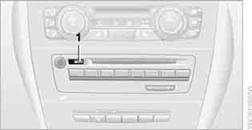
1. Press  button 1.
The DVD emerges slightly from the drive.
2. Remove the DVD.
Querying status1. Press the  button.
2. "Navigation update"
See also:
What to do if...
Information on suitable mobile phones.
The mobile phone could not be paired or connected.
Is Bluetooth activated in the vehicle and on
the mobile phone? Activate Bluetooth in the
vehicle an ...
Switching on/off
Press the button. ...
Look well ahead when driving
Avoid unnecessary acceleration and braking.
By maintaining a suitable distance to the vehicle
driving ahead of you.
Driving smoothly and looking ahead reduces
fuel consumption. ...