
Glove compartment
Opening
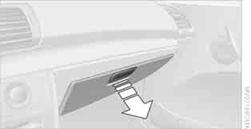
Pull the handle.
The light in the glove compartment comes on.
 To prevent injury in the event of an accident
while the vehicle is being driven, close the glove compartment immediately after
use.
To prevent injury in the event of an accident
while the vehicle is being driven, close the glove compartment immediately after
use.
Fold the cover up.
LockingTo lock the glove compartment, use the integrated key of the remote control.
USB interface for data transmission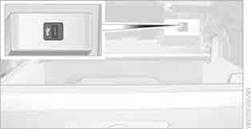
Port for importing and exporting data on USB devices, e.g. music collections.
Observe the following when connecting:
> Do not forcibly connect the plug to the USB interface.
> Do not connect devices such as fans or lamps to the USB interface.
> Do not connect USB hard discs.
> Do not use the USB interface to recharge external devices.
See also:
Shoulder support
Also supports the back in the shoulder area:
Results in a relaxed seating position.
Reduces strain on the shoulder muscles.
...
Rear doors
Rear doors
Push the locking lever on the rear doors down.
The door can now be opened from the outside
only. ...
Vehicle Overview
The rear-wheel-drive BMW 1 Series enters its fifth year on the market with a
few visual changes, as well as a new higher-performance version from BMW's M
division, dubbed the 1 Series M. Above the ...