
Parked car ventilation
The concept
The parked car ventilation provides ventilation to the passenger compartment and lowers its temperature, if necessary.
The parked car ventilation system is operated via iDrive. Two different switch-on times can be preselected.
The parked car ventilation remains switched on for approx. 30 minutes. The system can also be switched on and off directly. Due to its high power consumption, it should not be switched on twice in a row without driving in between to allow the battery to recharge.
The parked car ventilation system comes on if the outside temperature is above 59 7/15 6 when the switch-on time was preselected, but is ready for use at any temperature when the system is switched on directly.
The air emerges from the air vents for the upper body area in the instrument panel. The air vents must therefore be open.
Switching on and off directly1. "Settings"
2. "Climate"
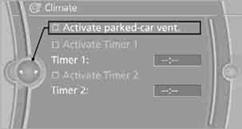
3. "Activate parked-car vent."
 The symbol on the automatic climate control display
flashes.
The symbol on the automatic climate control display
flashes.
1. "Settings"
2. "Climate"
3. "Activate Timer 1" or "Activate Timer 2"
4. "Timer 1:" or "Timer 2:"
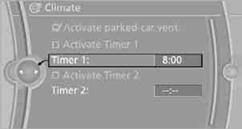
5. Turn the controller: set the hours.
6. Press the controller: the setting is accepted.
7. Turn the controller: set the minutes.
8. Press the controller: the setting is accepted.
The symbol on the automatic climate Control
Display lights up.
The symbol on the automatic climate Control Display
flashes when the system has switched on.
 The respective system is switched on within the
next 24 hours only. After these have elapsed, it must be reactivated.
The respective system is switched on within the
next 24 hours only. After these have elapsed, it must be reactivated.
See also:
Environmental conditions
Say the commands, numbers, and letters
smoothly and with normal volume, emphasis,
and speed.
Always say commands in the language of
the system. The language for the mobile
phone voice ...
Entertainment
This chapter helps assure your enjoyment when
receiving radio stations and playing CDs, DVDs,
and tracks from the music collection. ...
Adaptive fixing system
The adaptive fixing system is used to divide up
the cargo area. It consists of two brackets with
a telescopic rail and retaining straps. These are
guided into the two rails on the cargo area flo ...