
Display
Language on the Control Display
Setting the language
1. "Settings"
2. "Language/Units"
3. "Language:"
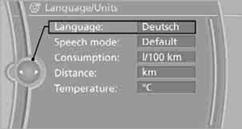
4. Select the desired language.
The setting is stored for the remote control currently in use.
Setting the voice dialog
Switch between a standard dialog and a short dialog.
1. "Settings"
2. "Language/Units"
3. "Speech mode:"
4. Select the desired dialog.
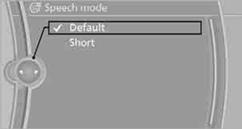
The setting is stored for the remote control currently in use.
Brightness of the Control DisplayThe brightness is automatically adapted to the ambient lighting conditions. However, you can change the basic setting.
1. "Settings"
2. "Control display"
3. "Brightness"
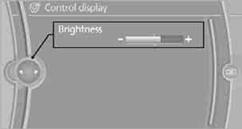
4. Turn the controller until the desired setting is selected.
5. Press the controller.
The setting is stored for the remote control currently in use. In bright conditions, for example, the brightness control may not be clearly visible.
See also:
Reading out loud
Text messages, e-mails, appointment entries,
tasks, and notes can be read out loud.
1. Select the desired message, appointment,
task, or note.
2. Select the symbol.
The following options are a ...
Vehicle equipment
All standard, country-specific and optional
equipment that is offered in the model series is
described in this chapter. Therefore, equipment
is also described that is not available in a vehicle,
e ...
After the ignition is switched off
The roof can still be operated for approx. 1 minute,
as long as no door has been opened. ...