
Speed limit
You can enter a speed, and a Check Control message will indicate when you reach this speed. This enables you, for example, to receive warnings if you exceed a speed limit in an urban area.
You are only warned of reaching this speed a second time if your vehicle speed falls below it again by at least 5 km/h.
Displaying, setting or changing the limit
1. "Settings"
2. "Speed"
3. "Warning at:"
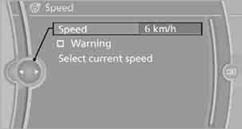
4. Turn the controller until the desired speed is displayed.
5. Press the controller. The speed limit is stored.
Applying your current speed as the limit
1. "Settings"
2. "Speed"
3. "Select current speed"
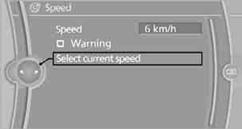
The system adopts your current speed as the limit.
Activating/deactivating the limit1. "Settings"
2. "Speed"
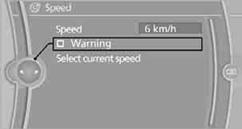
3. "Warning"
4. Press the controller.
See also:
System limits
Be alert
Due to system limitations, warnings may
be not be issued at all, or may be issued late or
improperly. Therefore, always be alert and ready
to intervene; otherwise, there is the danger ...
Coolant level
Checking
1. Let the engine cool.
2. The coolant level is correct if it lies between
the minimum and maximum marks. The
marks are on the side of the coolant reservoir.
Adding engine oil
1. Let ...
Bluetooth audio
At a glance
Music files on external devices such as audio
devices or mobile phones can be played
back via Bluetooth.
Use of a mobile phone as an audio source.
The sound is output on the ...