
Date
The settings are stored for the remote control currently in use, refer also to Personal Profile on page 28.
Setting the dateIn the instrument cluster
To set the dd/mm or mm/dd date format, refer to Setting the date format below.
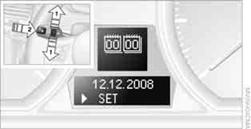
1. Push button 1in the turn signal/high beam lever up or down repeatedly
until the appropriate symbol appears in the display, accompanied by the date and
the word "SET".
2. Press button 2.
3. Use button 1to set the day of the month.
4. Press button 2to confirm the entry.
5. Set the month and the year in the same way.
6. Press button 2.
The system stores the new date.
Via iDrive
1. "Settings"
2. "Time/Date"
3. "Date:"
4. Turn the controller until the desired day is displayed, and press the controller.
5. Create the necessary settings for the month and year.
The date is stored.
Setting the date format1. "Settings"
2. "Time/Date"
3. "Format:"
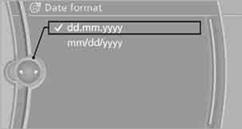
4. Select the desired format. The date format is stored.
See also:
Switch off the engine during
longer stops
Switch off the engine during longer stops, e.g.,
at traffic lights, railroad crossings or in traffic
congestion.
Fuel savings are achieved after the vehicle is
switched off for only approx. 4 s ...
Opening/closing the glass sunroof
When the sliding visor is open, proceed as described
under Sliding visor. ...
Vehicle equipment
All standard, country-specific and optional
equipment that is offered in the model series is
described in this chapter. Therefore, equipment
is also described that is not available in a vehicle, ...