
Settings and information
Operating principle
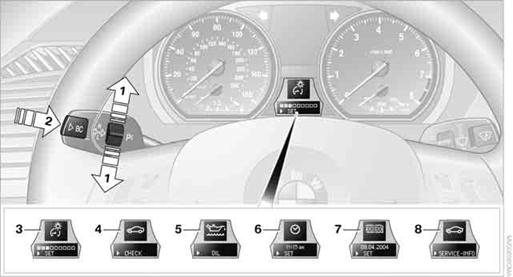
1. Button for:
> Selecting display
> Setting values
2. Button for:
> Confirming selected display or set values
> Calling up computer information
3. When the lights are on: instrument lighting brightness
4. Calling up Check Control
5. Checking oil level
6. Setting the time
7. Setting the date
8. Viewing service requirement display
The outside temperature reading and the time reappear when you press button 2or if you make no entries within approx. 15 seconds. If required, complete the current setting first.
See also:
Navigation
This chapter contains various examples of how
the navigation system can guide you reliably to
your destination. ...
The concept
The vehicle alarm system responds to:
▷ Opening of a door, the hood or the tailgate.
▷ Movements in the vehicle: interior motion
sensor
▷ Changes in the vehicle tilt, e.g., duri ...
Bluetooth audio
At a glance
▷ Music files on external devices such as audio
devices or mobile phones can be played
back via Bluetooth.
Use of a mobile phone as an audio source.
▷ The sound is outpu ...