
Computer
Displays in the instrument cluster
Calling up information
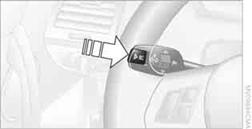
Press the button in the turn signal/high beam lever.
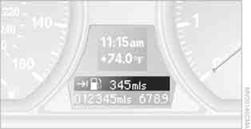
The following items of information are displayed in the order listed:
> Cruising range
> Average speed
> Average fuel consumption
> Current fuel consumption
> No information
To set the corresponding units of measure, refer to Units of measure on page 74.
Cruising range
Displays the estimated cruising range available with the remaining fuel. The range is calculated on the basis of the way the car has been driven over the last 18 miles/30 km and the amount of fuel currently in the tank.
 It is important that you refuel as soon as possible
once your cruising range falls below 30 miles/50 km; otherwise, engine functions
are not ensured and damage can occur.
It is important that you refuel as soon as possible
once your cruising range falls below 30 miles/50 km; otherwise, engine functions
are not ensured and damage can occur.
Average speed
Periods with the vehicle parked and the engine switched off are not included in the calculations of average speed.
With the trip computer, , you can have the average speed for another trip displayed.
To reset average speed: press the button in the turn signal/high beam lever for approx. 2 seconds.
Average fuel consumption
The average fuel consumption is calculated for the time during which the engine is running.
With the trip computer, , you can have the average consumption for another trip displayed.
To reset average fuel consumption: press the button in the turn signal/high beam lever for approx. 2 seconds.
Current fuel consumption
Displays the current fuel consumption. This allows you to see whether your current driving style is conducive to fuel economy with minimum exhaust emissions.
Displays on the Control DisplayThe computer can also be opened via iDrive.
1. "Vehicle Info"
2. "Onboard info" or "Trip computer"
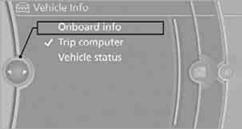
Displaying "Onboard info":
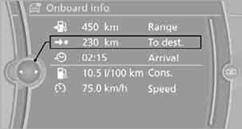
> Cruising range
> Distance from destination
> Estimated time of arrival if a destination has been entered in the navigation
system.
Displaying "Trip computer":
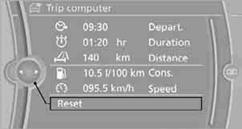
> Departure time
> Trip duration
> Trip distance
Both displays show:
> The average speed and
> the average fuel consumption.
Resetting the fuel consumption and speed
You can reset the values for average speed and average consumption:
1. Select the respective menu entry.
2. Press the controller again to confirm your selection.
Resetting the trip computer
You can reset all values:
1. "Vehicle Info"
2. "Trip computer"
3. "Reset"
See also:
Vehicle equipment
All standard, country-specific and optional
equipment that is offered in the model series is
described in this chapter. Therefore, equipment
is also described that is not available in a vehicle, ...
Climate control laminated tinted safety
glass
The vehicle glass provides full protection
against the harmful effects of UV radiation on the
skin. ...
The concept
The tire inflation pressure is measured in the
four mounted tires. The system notifies you if
there is a significant loss of pressure in one or
more tires. ...