
Odometer, outside temperature display, clock
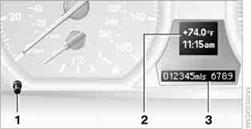
1. Knob in the instrument cluster
2. Outside temperature and clock
3. Odometer and trip odometer
> To reset the trip odometer while the ignition is switched on
> To display the time, outside temperature and odometer briefly while the ignition
is switched off
To select the respective units of measure, miles or km for the odometer as well as 7 or 6 for the outside temperature, refer to Units of measure on page 74.
The setting is stored for the remote control currently in use.
Time, outside temperature displaySetting the time.
Outside temperature warning
When the displayed temperature falls to approx.
+37 7/+3 6, a signal sounds and a warning lamp lights up. There is an increased risk of black ice.
Black ice can also form at temperatures above +37 7/+3 6. You should there fore drive carefully on bridges and shaded roads, for example; otherwise, there is an increased risk of an accident.
Odometer and trip odometerResetting the trip odometer:
With the ignition switched on, press button 1in the instrument cluster.
When the vehicle is parkedIf you still want to view the time, outside temperature and odometer reading briefly after the remote control has been taken out of the ignition lock:
Press button 1in the instrument cluster.
See also:
E-mail
Displaying e-mails
1. "Office"
2. "Messages"
3. Select the desired e-mail.
Displaying e-mail contacts
If the sender and recipient of an e-mail are transmitted
by the mobile ...
Switching off automatically
The system switches off and the LED goes out:
After approx. 160 ft/50 m when driving forward.
Above approx. 22 mph/36 km/h when driving
forward.
Switch on the system again if necessary. ...
Tachometer
Always avoid engine speeds in
the red warning field. In this
range, the fuel supply is interrupted
to protect the engine. ...