
Seat and mirror memory
You can store and call up two different combinations of driver's seat and exterior mirror positions.
Settings for the backrest width and lumbar support are not stored in memory.
Storing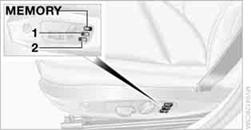
1. Switch on radio readiness or the ignition.
2. Adjust the seat and exterior mirrors to the desired positions.
3. Press the  button.
The LED in the button lights up.
4. Press the desired memory button 1or 2:
the LED goes out.
Call-up Do not call up the memory while you are driving;
otherwise, unexpected seat movement could result in an accident.
Do not call up the memory while you are driving;
otherwise, unexpected seat movement could result in an accident.
Comfort function
1. Unlock and open the driver's door or switch on radio readiness.
2. Briefly press the desired memory button 1
or 2.
The adjusting procedure is halted when you touch a seat adjustment switch or one of the memory buttons.
Safety feature
1. Close the driver's door and switch the ignition on or off.
2. Press the desired memory button 1or 2and keep it pressed
until the adjustment process has been completed.
If the  button was pressed accidentally: Press
the button again; the LED goes out.
button was pressed accidentally: Press
the button again; the LED goes out.
See also:
TeleService
General information
TeleService supports communication with your
service center.
▷ Data on the vehicle's service requirements
can be sent directly to the service center. In
this way, the ...
Check the tire inflation pressure regularly
Check and, if necessary, correct the tire inflation
pressure at least twice a month and before starting
on a long trip.
Low tire inflation pressure increases rolling resistance
and thus raises ...
Time, date, external temperature
From radio readiness the external temperature
and the time are displayed.
Set the time
Retrieving date
Retrieving date
Press the button on turn signal lever upward; the
date appears.
Set th ...