
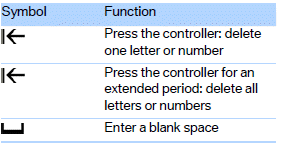
Entering letters and numbers
1. Turn the controller: select the letters or numbers.
2. Select additional letters or numbers if needed.
3. "OK": confirm entry.
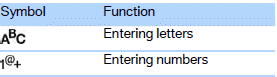
Depending on the menu, you can switch between entering letters and numbers:
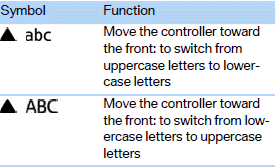
Depending on the menu, you can switch between entering uppercase letters and lowercase letters:
Entry of names and addresses: the selection is narrowed down every time a letter is entered and letters may be added automatically.
The entries are continuously compared to the data stored in the vehicle.
> During entry, only letters for which there are data are offered.
> Destination search: town/city names can be entered with the spelling used in any
of the languages available on the Control Display.
See also:
Entertainment
Operation of the radio, CD equipment and external audio devices as well as their
tone settings are described in this chapter. ...
Display in the instrument cluster
ECO PRO bonus range
An extension of the range can be
achieved by an adjusted driving
style.
This may be displayed as the bonus
range in the instrument cluster.
Driving style
In the tacho ...
Resetting the tone settings
1. "CD/Multimedia", "Radio" or "Settings"
2. "Tone"
3. "Reset" ...