
With the Professional navigation system: Split screen
General information
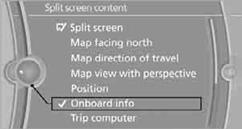
Additional information, e.g. from the computer, can be displayed on the right side of the split screen.
This information remains visible on the split screen even when you change to another menu.
Switching the split screen on and off1. Press the  button.
2. "Split screen"
Selecting display1. Press the button.
2. "Split screen"
3. Move the controller until the split screen is selected.
4. Press the controller or select "Split screen"
3. Move the controller until the split screen is
selected.
4. Press the controller or select "Split screen
content".
5. Select the desired menu item.
See also:
Connecting electrical devices
Note
Do not plug the charger into the socket
Do not connect battery chargers to the
factory-installed sockets in the vehicle. Doing so
may result in damage to the vehicle.◄
Sockets
Socket ...
Sport Line
With eye-catching exterior features in high-gloss black, this new line
accentuates the dynamic appearance of the BMW 3-Series Sedan. Eight heavily
contoured black kidney grille slats in a chrome-c ...
Using contact data
At a glanceContact data from appointments, tasks, text messages, emails, and notes can be
stored or selected, refer to page.
Displaying a contact or selecting a phone number
1. "Use co ...