
Controls at a glance
Controls
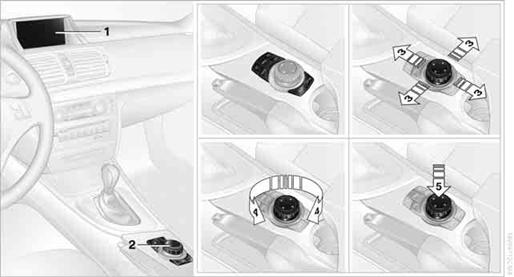
1. Control Display
2. Controller with buttons
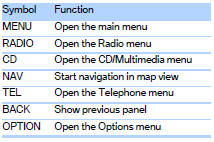
You can use the buttons to open the menus directly. The controller can be used to
select the menu items and create settings.
> Move in four directions, arrows 3
> Turn, arrow 4
> Push, arrow 5
Control Display
Notes
> Follow care instructions when cleaning the Control Display.
> Do not store items in the region in front of the Control Display; doing so may
damage the Control Display.
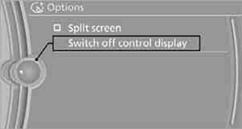
Switching off
1. Press the OPTIONbutton.
2. "Switch off control display"
Switching on
Press the controller to switch on.
Buttons on the controller
See also:
Camera
The camera is located near the base of the mirror.
Keep windshield clean and clear in the area in
front of the interior rear view mirror. ...
Locking the doors andwindows
Rear doors
Push the locking lever on the rear doors down.
The door can now be opened from the outside
only.
Safety switch for the rear
Press the button on the driver's
door if
children ar ...
Condensation under the parked vehicle
When using the automatic climate control, condensation
water develops that exits underneath
the vehicle.
Therefore, traces of condensed water under the
vehicle are normal. ...