
Example: setting the clock
Setting the clock
1.  Press the button. The main
menu is
displayed.
Press the button. The main
menu is
displayed.
2. Turn the controller until "Settings" is highlighted, and then press the controller.
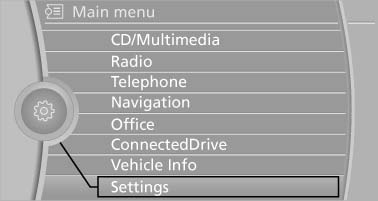
Turn the controller until "Settings" is highlighted,
and then press the controller
3. If necessary, move the controller to the left to display "Time/Date".
4. Turn the controller until "Time/Date" is highlighted, and then press the controller.
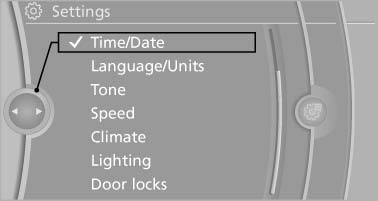
Turn the controller until "Time/Date" is highlighted,
and then press the controller
5. Turn the controller until "Time:" is highlighted, and then press the controller.
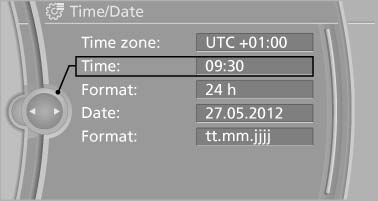
Turn the controller until "Time:" is highlighted,
and then press the controller
6. Turn the controller to set the hours and press the controller.
7. Turn the controller to set the minutes and press the controller.
See also:
Storing a channel
1. "Radio"
2. "Satellite radio"
3. If necessary, open "All channels" or the desired category.
4. Select the desired channel.
5. Press the controller again.
6. Press ...
Active front head restraints
In the event of a rear-end collision of sufficient
severity, the active head restraint reduces the
distance to the head.
Reduced protective function
▷ Do not use seat or head restraint c ...
Following the initial pairing
▷ The mobile phone is detected/connected in
the vehicle within a short period of time
when the engine is running or the ignition is
switched on.
▷ After they have been identified, p ...