
BMW Search
At a glance
A business search can be opened via BMW Search.
License conditions This product contains NetFront Browser software of ACCESS Co., Ltd. Copyright © 2007 ACCESS Co., Ltd. All rights reserved.
NetFront is a trademark or registered trademark of ACCESS CO., LTD., in Japan and other countries.
This software is based in part on the work of the Independent JPEG Group.
Requirements
► Subscription to the optional Convenience
Plan.
► The date setting, on the
Control Display is current.
► The vehicle is located within wireless network
coverage.
Starting BMW Search
1. "BMW Assist" or "ConnectedDrive"
2. "BMW Online"
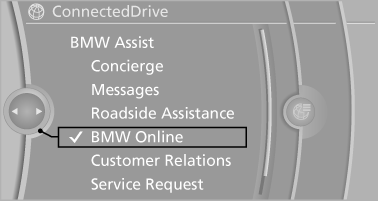
3. If necessary, "OK".
The BMW Search home page is displayed.
Operating BMW Search
To start a search:
► Turn the controller to highlight an element.
► Press the controller to display an element.
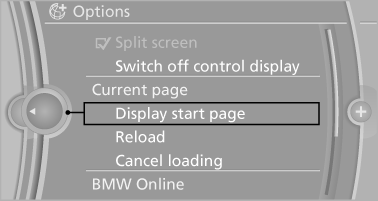
Opening the start page
1. "Options" Open.
2. "Display start page"
Loading a new page
1. "Options" Open.
2. "Update"
Cancel
1. "Options" Open.
2. "Cancel loading"
See also:
General information
BMW Assist provides you with certain services,
e.g., transmission of the position data of your
vehicle to the BMW Assist Response Center if
an Emergency Request has been initiated.
Many BMW Ass ...
General information
Your vehicle contains advanced technology for
the reduction of fuel consumption and emissions.
Fuel consumption depends on a number of different
factors.
The implementation of certain measures, ...
Roadside Assistance
At a glance
BMW Roadside Assistance can be contacted if
assistance is needed in the event of a breakdown.
Roadside Assistance can also be contacted via
a Check Control message.
Start Roadside A ...