
Notes
Displaying notes
1. "Office"
2. "Notes"
All notes are displayed.
Displaying the note
1. Select the desired note.
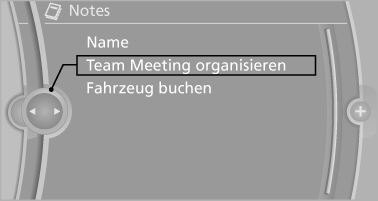
2. Scroll in the note if necessary:
► Turn the controller.
►

 Select the symbol.
Using contact data
Contact data from appointments, tasks, text messages, e-mails and notes can be saved or selected.
Reading the note out loud
Read the note out loud.
See also:
Camera
Rain, dirt, snow, or ice can impair camera operation.
The camera is automatically heated when the
external temperatures are low.
The camera is automatically cleaned together
with the headlamps ...
Starting aid terminals
Connecting order
Connect the jumper cables in the correct
order; otherwise, there is the danger of injury
from sparking.
The so-called starting aid terminal in the engine
compartment acts a ...
External temperature
External temperature warning
If the display drops to
+37 ℉/+3 ℃, a signal sounds.
A Check Control message is displayed.
There is the increased danger of
ice.
Ice on roads
Even ...