
Snap-in adapter
General information
Detailed information about snap-in adapters, which support the functions of the mobile phone, is available from the service center.
Notes
At high temperatures, the charge functions of the mobile phone can be limited under certain circumstances, and the functions are no longer executed.
When the mobile phone is used via the vehicle, heed the operating manual of the mobile phone.
Installation position
In the center armrest.
Inserting the snap-in adapter
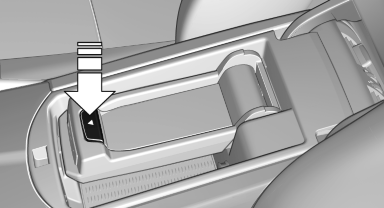
1. Press the button and remove the cover.
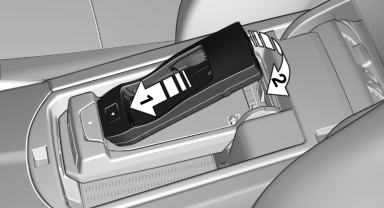
2. Insert the snap-in adapter in the direction of the arrow, arrow 1, and press down, arrow 2, until it engages.
Inserting the mobile phone
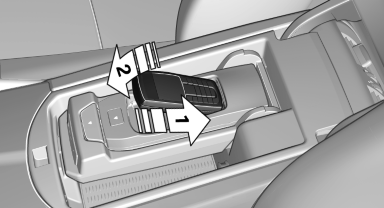
1. Depending on the mobile phone, remove the protective cap from the antenna connector and from the USB connection of the mobile phone.
2. Slide the mobile phone with the buttons facing up in the direction of the electrical connections, arrow 1, and push downward, arrow 2 until it engages.
Removing the mobile phone
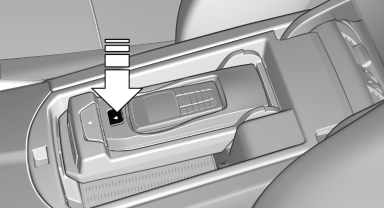
Press the button and remove the mobile phone.
See also:
Folding in display screen
When using the ski bag or when transporting
bulky pieces of luggage, the display screen
should be folded in, as otherwise it may be damaged.
Note when the display screen is folded
down
When ...
Charging the battery
In the vehicle, only charge the battery via the
terminals, in the engine compartment
with the engine off. ...
All around the steering wheel
All around the steering wheel
1 Roller sunblinds
2 Rear window safety switch
3 Power windows
4 Exterior mirror operation
5 Driver assistance systems
Active Blind Spot Detection
Collis ...