
Removing and inserting
Cargo cover without partition net:
Removing
The cover can be removed to load bulky luggage.
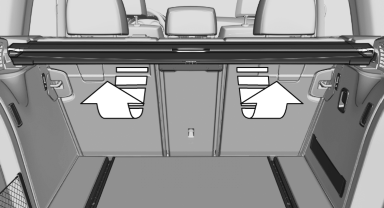
Reach under the cover and turn it upward, arrows.
Pull the cover back horizontally.
Cargo cover with partition net:
Removing
The cover can be removed to load bulky luggage.
1. Press the button, arrow 1, to unlock the cover.
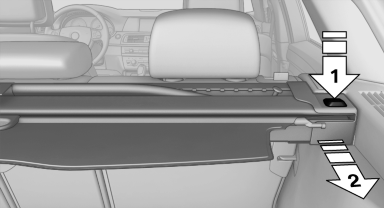
2. Pull the cover back, arrow 2.
Installing
Slide the cover forward horizontally into the two side brackets until it audibly latches.
The red warning fields disappear in the case of a cover with partition net.
Tug on the cover to check if it is properly locked in place.
See also:
Visual warning
The approach of the vehicle to an object can be
shown on the Control Display.
When the distance to an object is small, a red bar
is shown in front of the vehicle, as it is in the PDC
display.
...
Controls
Controls
1 Volume, on/off
2 Eject CD/DVD
3 CD/DVD drive
4 Change the entertainment source
5 Change station/track
6 Programmable memory buttons ...
Switching the system on/off
Press the left or right side of the button
on the CD/DVD player in the rear for the
respective page.
Rear entertainment and screens are switched
on/off.
After switching off the ignition, ...