
Ventilation
Front ventilation
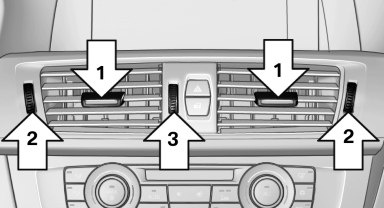
► Lever for changing the air flow direction, arrow 1.
► Thumbwheels for opening and closing the
vents continuously, arrows 2.
► Thumbwheel to vary the temperature, arrow3.
Toward blue: colder.
Toward red: warmer.
Adjusting the ventilation
► Ventilation for cooling:
Adjust the vent to direct the air in your direction, e.g., if the vehicle interior is hot from the sun.
► Draft-free ventilation:
Adjust the vent to let the air flow past you.
Ventilation in the rear
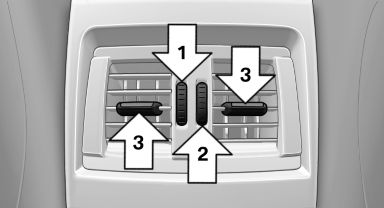
► Thumbwheel for opening and closing the
vents continuously, arrow 1.
► Thumbwheel to vary the temperature, arrow 2.
Toward blue: colder.
Toward red: warmer.
► Lever for changing the air flow direction, arrow 3.
See also:
PlugIn
Selected functions of the cell phone are displayed
on the Control Display. They can be operated
via iDrive.
1. Connect cell phone via the snap-in adapter.
2. "ConnectedDrive"
3. " ...
Stored stations
General information
It is possible to store up to 40 stations.
Calling up a station
1. "Radio"
2. "Presets"
3. Select the desired station.
Storing a station
The station curr ...
Buttons on the remote control
Buttons on the remote control
1 Unlocking
2 Locking
3 Opening the trunk lid
4 Panic mode in alarm system ...