
Head-up Display
The concept
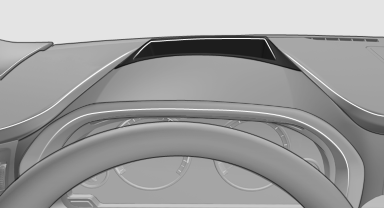
This system projects important information into the driver's field of vision, e.g., the speed.
In this way, the driver can get information without averting his or her eyes from the road.
Display visibility
The visibility of the displays in the Head-up Display is influenced by:
► Certain sitting positions.
► Objects on the cover of the Head-up Display.
► Sunglasses with certain polarization filters.
► Wet roads.
► Unfavorable light conditions.
If the image is distorted, check the basic settings.
Switching on/off
1. "Settings"
2. "Head-up display"
3. "Head-up display"
Switch the Head-up Display ON/OFF as required.
Display
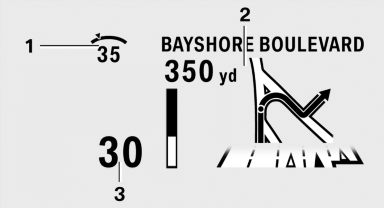
1 Desired speed
2 Navigation system
3 Speed
Selecting displays in the Head-up Display
1. "Settings"
2. "Head-up display"
3. "Displayed information"
4. Select the desired displays in the Head-up
Display.
The settings are stored for the remote control currently in use.
Setting the brightness
The brightness is automatically adjusted to the ambient light.
The basic setting can be adjusted manually.
1. "Settings"
2. "Head-up display"
3. "Brightness"
4. Turn the controller.
The brightness is adjusted.
When the low beams are switched on, the brightness of the Head-up Display can be additionally influenced using the instrument lighting, refer to page 88.
The setting is stored for the remote control currently in use.
Adjusting the height
1. "Settings"
2. "Head-up display"
3. "Height"
4. Turn the controller.
The height is adjusted.
The setting is stored for the remote control currently in use.
Special windshield
The windshield is part of the system.
The shape of the windshield makes it possible to display a precise image.
A film in the windshield prevents double images from being displayed.
Therefore, have the special windshield replaced by a service center only.
See also:
Snap-in adapter
Installation locationIn the center armrest.
Inserting snap-in adapter
1. Press the button and remove the cover.
2. Insert the snap-in adapter at the front, arrow 1, and press downward, ...
Comparison with ordinary remote control
The functions can be controlled by pressing the
buttons of the remote control or Comfort Access.
Unlocking
Grasp the door handle on the driver's or front
passenger door completely, arrow 1. Th ...
The concept
The system issues a two-phase warning of a
danger of collision at speeds above approx.
10 mph/15 km/h.
The collision warning is available even if cruise
control has been deactivated.
It resp ...