
Brightness
Setting the brightness
To set the brightness of the Control Display:
1. "Settings"
2. "Control display"
3. "Brightness"
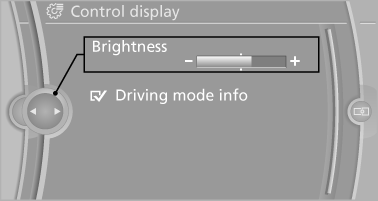
4. Turn the controller until the desired brightness
is set.
5. Press the controller.
The setting is stored for the remote control currently in use.
Depending on the light conditions, the brightness control may not be clearly visible.
See also:
Engine oil
Vehicle equipment
All standard, country-specific and optional
equipment that is offered in the model series is
described in this chapter. Therefore, equipment
is also described that is not avai ...
Hands-free system
General information
Calls that are being made on the hands-free
system can be continued on the mobile phone
and vice versa.
From the mobile phone to the handsfree
system
Calls that were begun ...
Environmental conditions
► Say the commands, numbers, and letters
smoothly and with normal volume, emphasis,
and speed.
► Always say commands in the language of
the voice activation system.
► When selec ...