
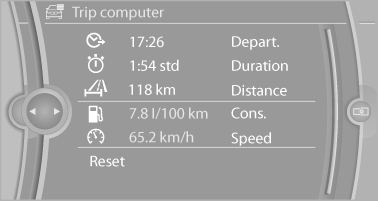
Trip computer
There are two types of computer.
► "Onboard info": the values can be reset as
often as necessary.
► "Trip computer": the values provide an overview
of the current trip.
Resetting the trip computer
1. "Vehicle Info"
2. "Trip computer"
3. "Reset": all values are reset.
"Automatically reset": all values are reset approx. 4 hours after the vehicle comes to a standstill.
See also:
Closing
Recessed grips on the inside trim of the tailgate
can be used to conveniently pull down the tailgate.
Danger of pinching
Make sure that the closing path of the tailgate
is clear; otherwise, inj ...
Overview
In 2004 BMW X3 introduced a new concept to the market: the small, premium
Sports Activity Vehicle with all-road capability and unparalleled driving
dynamics. This first generation BMW X3 became a ...
Automatic Service Request
The TeleService data necessary for servicing
the vehicle are automatically sent to your service
partner prior to the service deadline. If possible,
the service partner will contact you and a ser ...