
Calling up information on the infodisplay
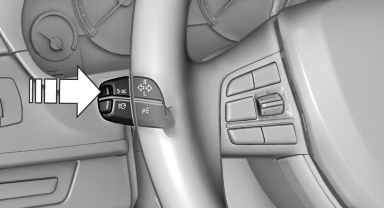
Press the onboard computer button on the turn signal lever.
Information is displayed on the info display of the instrument cluster.
See also:
Maximum cooling
Press the button.
The system is set to the lowest
temperature, maximum air volume
and recirculated-air mode.
Air flows out of the vents for the upper body region.
Open them for this purpose.
...
Children should always be in the rear
Accident research shows that the safest place
for children is in the back seat.
Transporting children in the rear
Only transport children younger than
13 years of age or shorter than 5 ft/1 ...
USB audio interface/audio interface for mobile phone
OverviewIt is possible to connect external audio devices. They can be operated via iDrive.
Sound is output over the vehicle speakers.
Options for connecting external devices
> Connection via US ...