
Service requirements
Display
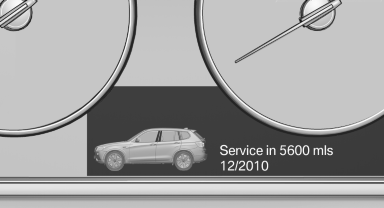
The driving distance or the time to the next scheduled maintenance is displayed briefly after the ignition is switched on.
The current service requirements can be read out from the remote control by the service specialist.
Data regarding the maintenance status or legally mandated inspections of the vehicle are automatically transmitted to your service center before a service due date, Automatic Service Request, refer to page 225.
Detailed information on service requirements
More information on the scope of service required can be displayed on the Control Display.
1. "Vehicle Info"
2. "Vehicle status"
3.  "Service required"
Required maintenance procedures and legally mandated inspections are displayed.
4. Select an entry to call up detailed information.
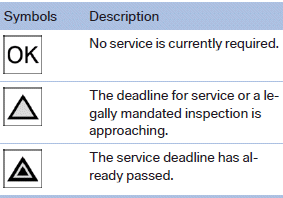
Symbols
Entering appointment dates
Enter the dates for the required inspections.
Ensure that the vehicle date and time are set correctly.
1. "Vehicle Info"
2. "Vehicle status"
3. "Service required"
4. "§ Vehicle inspection"
5. "Date:"
6. Create the settings.
7. Confirm.
The entered date is stored.
Automatic Service Request
Data regarding the maintenance status or legally mandated inspections of the vehicle are automatically transmitted to your service center before a service due date.
You can check when your service center was notified.
1. "Vehicle Info"
2. "Vehicle status"
3. Open "Options".
4. "Last Service Request"
See also:
Ride & Handling
The X6 surprised me here, and in a good way. Upon sizing up its aggressive
design, you might think that this is an SUV that's all about delivering a
performance driving experience, even if it come ...
Adding engine oil
Filler neck
Only replenish the maximum oil amount of
1 US quart/liter if the message is displayed in the
instrument cluster or the oil level has dropped to
just at the lower mark of the dipst ...
Parts and accessories
For your own safety, use genuine parts and accessories
approved by BMW. When you purchase
accessories tested and approved by
BMW and Genuine BMW Parts, you simultaneously
acquire the assurance ...