
Hiding Check Control messages
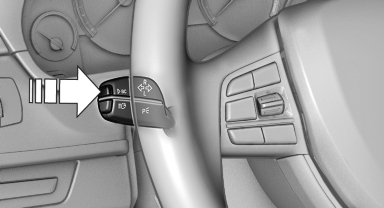
Press the computer button on the turn signal lever.
► Some Check Control messages are displayed continuously and are not cleared until the malfunction is eliminated. If several malfunctions occur at once, the messages are displayed consecutively.
These messages can be hidden for approx.
8 seconds. After this time, they are displayed again automatically.
► Other Check Control messages are hidden automatically after approx. 20 seconds.
They are stored and can be displayed again later.
See also:
TeleService
General information
TeleService supports communication with your
service center.
▷ Data on the vehicle's service requirements
can be sent directly to the service center. In
this way, the ...
Manual transmission
Starting the engine
1. Depress the brake pedal.
2. Press on the clutch and shift to neutral.
3. Press the Start/Stop button.
The ignition is activated automatically for a certain
time and is sto ...
The concept
The central locking system becomes active
when the driver's door is closed.
The system simultaneously engages and releases
the locks on the following:
▷ Doors.
▷ Trunk lid.
▷ ...