
Sport program DS and manual mode M/S
Activating sport program DS
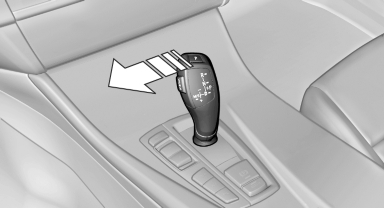
Push the selector lever to the left out of transmission position D.
DS is displayed in the instrument cluster.
The sport program of the transmission is activated.
Activating the M/S manual mode
Push the selector lever to the left out of transmission position D.
Push the selector lever forward or backward.
Manual mode becomes active and the gear is changed.
The engaged gear is displayed in the instrument cluster, e.g., M1.
► To shift down: press the selector lever forward.
► To shift up: pull the selector lever rearwards.
The vehicle only shifts up or down at appropriate engine and road speeds, e.g., it does not shift down if the engine speed is too high.
The selected gear is briefly displayed in the instrument cluster, followed by the current gear.
Manual mode M/S: prevent automatic upshifting
Once maximum engine speed is attained, M/S manual mode is automatically upshifted as needed.
For vehicles with Sport automatic transmissions, automatic shift operations are not performed if one of the following conditions is met:
► DSC deactivated.
► TRACTION activated.
► SPORT+ activated.
In addition, the kickdown is deactivated.
Ending the sport program/manual mode
See also:
Comparison with ordinary remote
control
The functions can be controlled by pressing the
buttons or via Comfort Access.
Should a short delay occur when opening or
closing the windows or the glass sunroof/panoramic
glass sunroof, the s ...
Display
The following is displayed in the instrument
cluster.
Speed limit detection
▷ Current speed limit.
▷ No speed limit - for the German
autobahn.
▷ Speed limit detection is no ...
Warning triangle
The warning triangle is located in the container
on the inside of the trunk lid.
Unscrew the wing nut to open. ...