
Automatic locking
The setting is stored for the remote control currently in use.
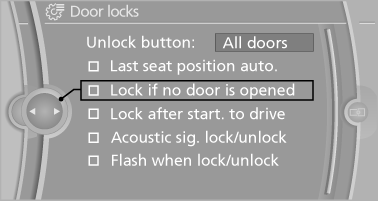
1. "Settings"
2. "Door locks"
3. Select the desired function:
► "Lock if no door is opened"
The vehicle locks automatically after a
short period of time if a door is not
opened.
► "Lock after start. to drive"
The vehicle locks automatically after
you drive away.
See also:
Starting the engine
Starting the engine
The engine starts automatically under the following
conditions:
► Automatic transmission:
By releasing the brake pedal.
When Automatic Hold is activated: press the ...
Changing the map section
"Interactive map"
▷ To shift the map: move the controller in the
required direction.
▷ To shift the map diagonally: move the controller
in the required direction and turn ...
Reading lamps
Reading lamps
Press the button.
Reading lamps are located at the front and rear
next to the interior lamps. ...