
BMW Search
At a glance
A business search can be opened via BMW Search.
License conditions
This product contains NetFront Browser software of ACCESS Co., Ltd. Copyright © 2007 ACCESS Co., Ltd. All rights reserved.
NetFront is a trademark or registered trademark of ACCESS CO., LTD., in Japan and other countries.
This software is based in part on the work of the Independent JPEG Group.
Requirements
▷ Subscription to the optional Convenience Plan.
▷ The date setting, on the Control Display is current.
▷ The vehicle is located within wireless network coverage.
Starting BMW Search
1. "BMW Assist" or "ConnectedDrive".
2. "BMW Online"
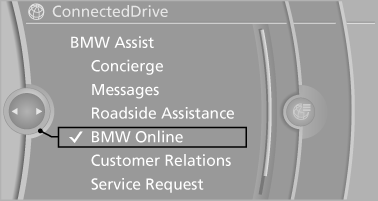
3. If necessary, "OK".
The BMW Search home page is displayed.
Operating BMW Search
To start a search:
▷ Turn the controller to highlight an element.
▷ Press the controller to display an element.
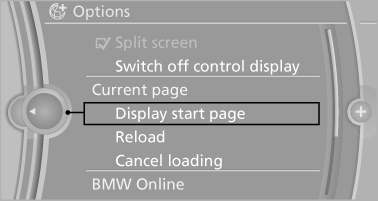
Opening the start page
1. "Options" Open.
2. "Display start page"
Loading a new page
1. "Options" Open.
2. "Update"
Cancel
1. "Options" Open.
2. "Cancel loading"
See also:
Convertible: cargo loading
Enlarging the cargo area
When the convertible top is closed you can enlarge the cargo area:
To do so, fold the cargo area partition upward.
Before opening the convertible top, pull the cargo area p ...
Vehicle equipment
All standard, country-specific and optional
equipment that is offered in the model series is
described in this chapter. Therefore, equipment
is also described that is not available in a vehicle,
e ...
Backrest width
Change the width of the backrest using the side
wings to adjust the lateral support.
To make it easier to enter and exit the vehicle,
the backrest width temporarily opens fully. ...