
Roadside Assistance
At a glance
BMW Roadside Assistance can be contacted if assistance is needed in the event of a breakdown.
Roadside Assistance can also be contacted via a Check Control message.
Start Roadside Assistance without BMW Assist or TeleServices
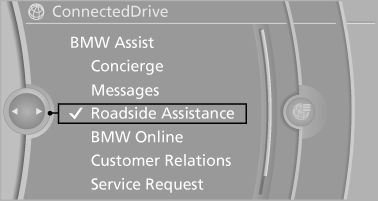
1. "BMW Assist" or "ConnectedDrive".
2. "Roadside Assistance"
The Roadside Assistance number is displayed.
If the mobile phone is paired, a connection is established to Roadside Assistance.
Start Roadside Assistance with BMW Assist or TeleServices
General information
If the vehicle is equipped with TeleServices, support is first offered through TeleService Diagnosis and, where applicable, then through TeleService Help.
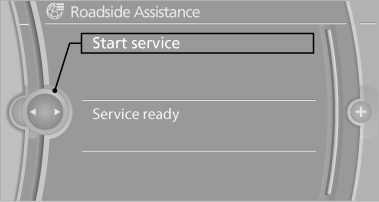
1. "BMW Assist" or "ConnectedDrive".
2. "Roadside Assistance".
3. "Start service"
TeleService Diagnosis
TeleService Diagnosis enables the wireless transmission of detailed vehicle data that are important for vehicle diagnosis. These data are transmitted automatically.
After the data are transmitted, the voice connection to Roadside Assistance is re-established.
See also:
Tire inflation pressures up to 100 mph/160 km/h
For speeds of up to 100 mph/160 km/h and for
optimum driving comfort, note the pressure values
in the tire inflation pressure table, refer to
page 238, and adjust as necessary.
These pressure va ...
Saving the spoken instructions on the
programmable memory buttons
The function for switching the spoken instructions
on/off can be stored on a programmable
memory button, for quick access. ...
Swapping the telephone and additional
telephone
The function of the telephone and additional telephone
can be swapped automatically.
1. "Telephone"
2. "Bluetooth® (phone)"
3. "Swap phone/addit. phone" ...