
Calendar
Display the calendar
Appointments during the last 20 and the next 50 days can be displayed.
1. "Office".
2. "Calendar"
The appointments on the current day are displayed.
Selecting the calendar day
1. Select the date.
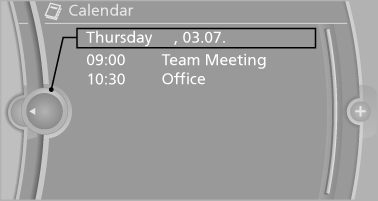
2. Select the desired day or date.
▷ "Next day".
▷ "Date:".
▷ "Previous day".
▷ "Today"
Display the appointment
1. Select the desired appointment.
2. Scroll through the appointment if necessary:
▷ Turn the controller.
▷  Select the symbol.
Using contact data
Contact data from appointments, tasks, text messages, e-mails and notes can be saved or selected.
Reading the appointment out loud
Read the appointment out loud.
See also:
Lateral ventilation
▷ Thumbwheel for opening and closing the
vents continuously, arrow 1.
▷ Lever for changing the air flow direction, arrow
2. ...
Determining the load limit
1. Locate the following statement on your vehicle’s
placard:
► The combined weight of occupants and
cargo should never exceed XXX kg or
YYY lbs. Otherwise, damage to the vehicle
and uns ...
Tilt alarm sensor
The tilt of the vehicle is monitored.
The alarm system responds in situations such
as attempts to steal a wheel or when the car is
towed. ...