
Snap-in adapter
General information
Detailed information about snap-in adapter, which supports the functions of the mobile phone, available from the service center.
Notes
At high temperatures, the charge function of the mobile phone can be limited where appropriate and the functions are no longer executed.
When the mobile phone is used via the vehicle, heed the operating manual of the mobile phone.
Installation position
In the center armrest.
Inserting the snap-in adapter
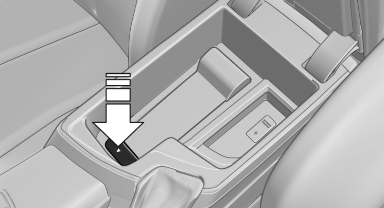
1. Press the button and remove the cover.
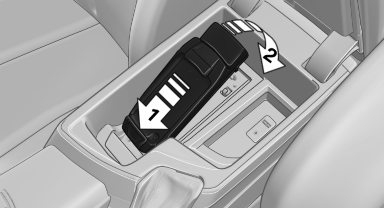
2. Insert the snap-in adapter at the front, arrow 1, and press down, arrow 2, until it engages.
Inserting the mobile phone
1. Depending on the mobile phone, remove the protective cap from the antenna connector and from the USB connection of the mobile phone.
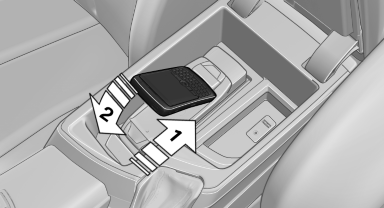
2. Slide the mobile phone with the buttons facing up in the direction of the electrical connections, arrow 1, and push downward, arrow 2 until it engages.
Removing the mobile phone
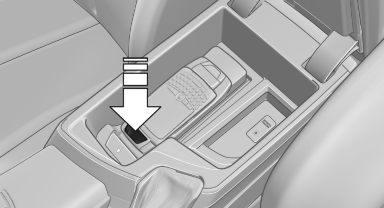
Press the button and remove the mobile phone.
See also:
Child restraint fixing system with a tether strap
Mounting points
LATCH mounting eyes
Only use the mounting eyes for the upper
LATCH retaining strap to secure child restraint
fixing systems; otherwise, the mounting eyes
could be damaged. ...
Status display
The tire and system status is indicated by the
color of the tires.
A change in the tire inflation pressure during
driving is taken into account.
A correction is only necessary if this is indicat ...
Three different drive modes
There are three different modes that the transmission works under: Drive,
Sport or Manual. Sport mode provides a more aggressive shifting, holding gears
longer and letting you stay in the engine's ...