
Received calls
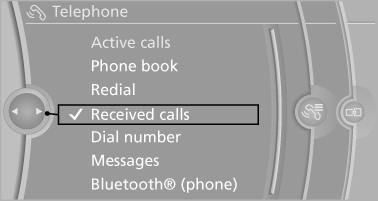
Displaying calls
The 20 calls that were last received are displayed.
1. "Telephone".
2. "Received calls"
Calling a number from the list
Selecting an entry.
The connection is established.
Deleting a single entry or all entries
The erasure of entries depends on the mobile phone.
1. Highlight the entry.
2. "Options" Open.
3. "Delete entry" or"Delete list"
Saving an entry in the contacts
1. Highlight the entry.
2. "Options" Open.
3. "Store as new contact" or "Add to existing contact".
4. Select the contact, if necessary.
5. Select the type of number: "Home", "Business", "Mobile" or "Other".
6. Complete the entries if necessary.
7. "Store contact"
See also:
Trip computer
There are two types of computer.
▷ "Onboard info": the values can be reset as
often as necessary.
▷ "Trip computer": the values provide an overview
of the current ...
Starting the engine
Starting the engine
Remote control in the ignition lock or, with Comfort
Access, inside the vehicle
1. Depress the brake pedal.
2. Press the Start/Stop button.
The starter operates automatical ...
Mounting LATCH child restraint fixing
systems
1. Mount the child restraint fixing system; refer
to the operating instructions of the system.
2. Ensure that both LATCH anchors are properly
connected. ...