
Pairing and connecting cell phone
 Pairing the mobile phone
To avoid becoming distracted and posing an unnecessary hazard both to your own vehicle's occupants and to other road users, only pair the mobile phone while the vehicle is stationary.
1. "Telephone".
2. "Bluetooth® (phone)".
3. "Add new phone".
The Bluetooth name of the vehicle is displayed.
4. To perform additional steps on the mobile phone, refer to the mobile phone operating instructions: e.g. search for or connect the Bluetooth device or a new device.
The Bluetooth name of the vehicle appears on the mobile phone display.
5. Select the Bluetooth name of the vehicle on the mobile phone display.
Prompt via iDrive or the mobile phone to enter the same Bluetooth passkey.
6. Enter the passkey and confirm.
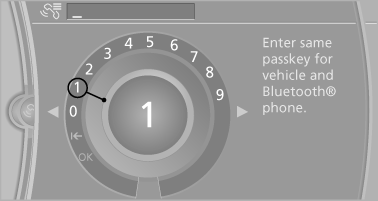
7. Select the functions for which the mobile phone is to be used.
8. "OK"
If the pairing was successful, the mobile phone appears at the top of the list of mobile phones.
The functions supported by the mobile phone and audio device are displayed as symbols when paired.
White symbol: the function is active.
Gray symbol: the function is inactive.
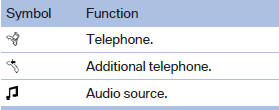
Four mobile phones can be paired with the vehicle at once. Three mobile phones can be connected with the vehicle at once.
If pairing was unsuccessful: What to do if...
See also:
Sound output
Switching on/off
When the ignition is switched off: press ON/OFF
button on the radio.
Muting
When the ignition is switched on or the engine
is running: press the ON/OFF button on the
radio. ...
Body and safety: The safest BMW 3-Series yet
The new BMW 3-Series offers its passengers exceptional active and passive
safety. Judicious selection of materials, a high-strength structure and an
intelligent lightweight design concept allow th ...
Office information
The number of unread messages and active
tasks as well as the upcoming appointments are
displayed.
1. "Office"
2. "Current office"
3. Select the desired entry to display det ...