
Equalizer
Setting for individual audio frequency ranges.
Adjusting the equalizer
1. "CD/Multimedia", "Radio" or "Settings".
2. "Tone".
3. "Equalizer".
4. Select the desired setting.
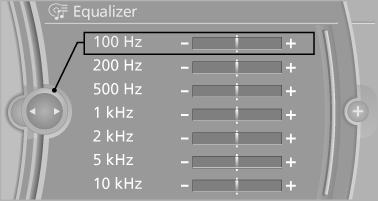
5. To adjust: turn the controller.
6. To store: press the controller.
See also:
Switching on
The cooler can be operated at two levels.
1. Switch on the ignition.
2. Press the button once for
each cooling
level.
The highest cooling power is active when
two LEDs are lit.
If the coole ...
Front: manual transmission
Opening
Press on the cover.
Emptying
Take out the insert.
Lighter
Push in the lighter.
The lighter can be removed as
soon as it pops back out.
Danger of burns
Only hold the hot lighter b ...
At a glance
These overviews of buttons, switches and
displays are intended to familiarize you with your
vehicle. You will also become quickly acquainted
with the available control concepts and options. ...