
Treble, bass, balance, and fader
▷ "Treble": treble adjustment.
▷ "Bass": depth adjustment.
▷ "Balance": left/right volume distribution.
▷ "Fader": front/rear volume distribution.
Setting treble, bass, balance, and fader
1. "CD/Multimedia", "Radio" or "Settings".
2. "Tone"
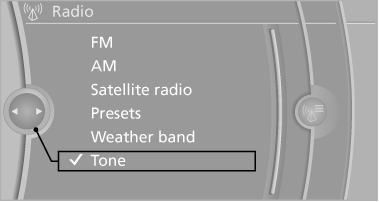
3. Select the desired tone settings.
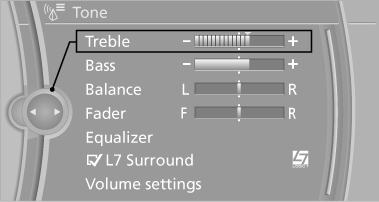
4. To adjust: turn the controller.
5. To store: press the controller.
See also:
Speed Limit Info with No Passing Info display and Speed Limit Device
In combination with the navigation system Professional or Business, Speed
Limit Info helps alert drivers to the current speed limit on the road on which
they are travelling. The camera integrated ...
Camera
Camera
The camera is located near the base of the mirror.
Keep windshield clean and clear in the area in
front of the interior rear view mirror. ...
For Canadian customers
Canadian customers who wish to report a
safety-related defect to Transport Canada, Defect
Investigations and Recalls, may telephone
the toll-free hotline 1-800-333-0510. You can
also obtain ot ...