
Setting the compass zones
Sets the particular compass zones on the vehicle so that the compass operates correctly; refer to World map with compass zones.
World map with compass zones
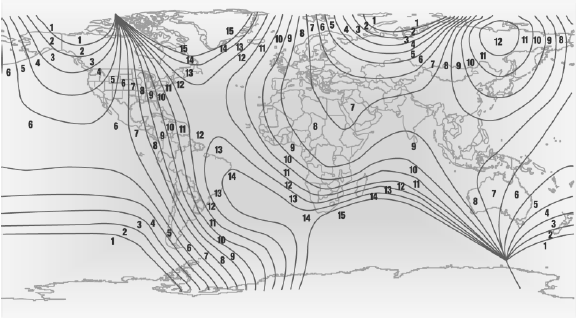
World map with compass zones
Procedure
1. Press and hold the control button for approx.
3 to 4 seconds. The number of the set compass zone appears in the mirror.
2. To change the zone setting, press the control button quickly and repeatedly until the number of the compass zone corresponding to your location appears in the mirror.
The set zone is stored automatically. The compass is ready for use again after approximately 10 seconds.
See also:
Remote control
Each remote control contains a rechargeable battery that is automatically recharged
when it is in the ignition lock while the car is being driven. Use each remote control
at least twice a year f ...
Shift paddles for Sport automatic
transmission
Shift paddles for Sport automatic
transmission
The shift paddles on the steering wheel allow
you to shift gears quickly while keeping both
hands on the steering wheel.
If the shift paddles o ...
Adjusting the side extensions
Fold the side extensions on the head restraint
forward for increased lateral support in the resting
position. ...