
Display in the instrument cluster
The collision warning can be issued in the instrument cluster, in the Head-up Display, and acoustically.
Warning stages
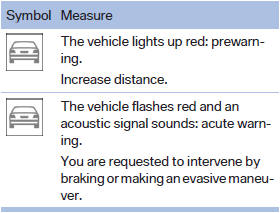
 Adapting your speed and driving
style
Adapting your speed and driving
style
The display does not relieve the driver of the responsibility to adapt his or her driving speed and style to the traffic conditions.
See also:
DTMF suffix dialing
DTMF suffix dialing can be used for gaining access
to network services or for controlling devices,
e.g., to make a remote inquiry of an answering
machine. The DTMF code is needed for this
purpose. ...
Vehicle equipment
All standard, country-specific and optional
equipment that is offered in the model series is
described in this chapter. Therefore, equipment
is also described that is not available in a vehicle, ...
Displays in the instrument cluster
Indicator lamp
Depending on how the vehicle is
equipped,
the indicator lamp in the instrument
cluster indicates whether the system is
switched on.
Desired speed
▷ The marking light ...