
Radar sensor
Position
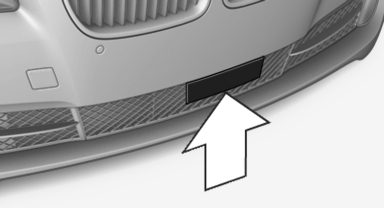
Radar sensor
Dirty or covered sensor
A dirty or covered sensor may hinder the detection of vehicles.
▷ If necessary, clean the radar sensor. Remove layers of snow and ice carefully.
▷ Do not cover the view field of the radar sensor.
Malfunction
The system cannot be activated if the sensor is not aligned correctly. This may be caused by damage incurred during parking, for example.
A Check Control message is displayed if the system fails.
For US owners only
The transmitter and receiver units comply with
part 15 of the FCC/Federal Communication
Commission regulations. Operation is governed
by the following:
FCC ID:
▷ OAYARS3-A
Compliance statement:
This device complies with part 15 of the FCC
Rules. Operation is subject to the following two
conditions:
▷ This device may not cause harmful interference,
and
▷ this device must accept any interference received,
including interference that may
cause undesired operation.
Any unauthorized modifications or changes to these devices could void the user's authority to operate this equipment.
Note
To reduce electromagnetic effects, please use properly.
The standard SAR value is 2.0 W/kg; the tested value of this product is 0.751 W/kg.
NCC declaration:
1. Companies or persons without authorization should not change the frequency, increase the power, or change the characteristics or functions of the original design of low-power radio frequency devices with type approval.
2. Low-power radio frequency devices should not impair legal communication or flight safety. If this type of impairment is detected, the device should be switched off immediately.
In this case, please contact the manufacturer and only use the product after the problem has been corrected.
3. The "legal communication" specified above refers to communication in accordance with telecommunication regulations. Low-power devices should withstand interference from legal communication and ISM devices.
See also:
BMW Assist or ConnectedDrive
...
The concept
Dynamic Performance Control optimizes the
handling characteristics of your vehicle when
starting off, cornering, and during evasive maneuvers.
To achieve this, the system variably distributes
t ...
System limits
Speed range
Best results are achieved when using the system
on well-developed roads and highways.
The desired speed can be selected between
20 mph/30 km/h to 110 mph/180 km/h.
The system can a ...