
ECO PRO
Consistent tuning to minimize fuel consumption for maximum range with maximum driving stabilization.
Comfort functions and the engine controller are adjusted.
The program can be configured to individual specifications.
Activating ECO PRO

Press button repeatedly until ECO PRO is displayed in the instrument cluster.
Configuring ECO PRO
1. Activate ECO PRO.
2. "Configure ECO PRO"
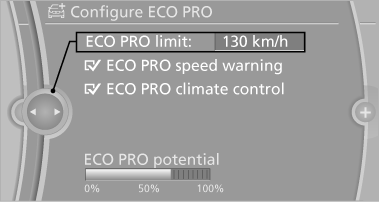
or
1. "Settings"
2. "Driving mode"
3. "Configure ECO PRO"
Make the desired settings.
See also:
Language
Setting the language
To set the language on the Control Display:
1. "Settings"
2. "Language/Units"
3. "Language:"
4. Select the desired language.
The setting is s ...
Advanced BMW EfficientDynamics technology puts the new BMW 1-Series in a
class of its own
Back in 2007, the BMW 1-Series set a new global benchmark, with a unique
range of technologies to reduce fuel consumption and emissions being included as
standard. Today, the new BMW 1-Series exte ...
Navigation data
Information on the navigation data
1. "Navigation"
2. "Options" Open.
3. "Navigation system version": information on
the data version is displayed.
Updating the nav ...