
Ambient light
Depending on the equipment, the lighting can be individually adjusted in the interior for some lights.
Selecting color scheme
1. "Settings"
2. "Lighting"
3. "Ambient:"
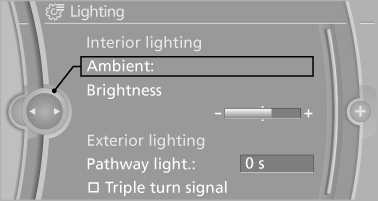
4. Select the desired setting.
If the color scheme of the line is selected and the welcome lamps are activated, the welcome lamps are displayed in color when unlocking the vehicle.
Setting the brightness
The brightness of the ambient light can be adjusted via the thumbwheel for the instrument lighting but also independently of it.
1. "Settings"
2. "Lighting"
3. "Brightness"
4. Adjust the brightness.
See also:
Service data in the remote control
Information on the required maintenance is continuously
stored in the remote control. Your
service center will read out this data and suggest
the right array of service procedures for your vehic ...
System limits
Personal responsibility
The system cannot serve as a substitute
for the driver's personal judgment of the course
of the road and the traffic situation.
In the event of a warning, do not jerk th ...
Route
Different views of the route are available during
destination guidance:
► Arrow view in the instrument cluster and on
the Control Display.
► List of route sections.
► Map view.
...