
Activating
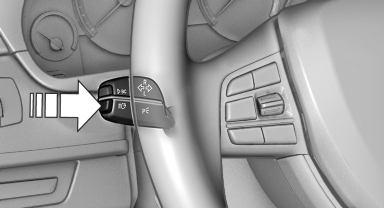
Activating
The High-beam Assistant can be activated when the low beams are switched on.
1. Turn the light switch to  or
or
 .
.
2. Press the button on the turn signal lever, arrow.

The indicator lamp in the instrument cluster lights up.
When the low beams are on, the lights are automatically brightened or dimmed.
The system responds to light from oncoming traffic and traffic driving ahead of you, and to adequate illumination, e.g., in towns and cities.

The blue indicator lamp in the instrument cluster lights up when the system switches on the high beams. Depending on the version of the system in the vehicle, the high beams may not switch off for oncoming vehicles, but may only be dimmed in the areas that blind oncoming traffic. In this case, the blue indicator light will stay on.
See also:
Opening and closing: Using the remote control
Persons or animals in a parked vehicle could
lock the doors from the inside. You should therefore take the remote control with
you when you leave the vehicle so that the latter can be opened from ...
Programming
▷ LED, arrow 1.
▷ Memory buttons, arrow 2.
Fixed-code hand-held transmitters
1. Switch on the ignition.
2. Initial setup:
Press the two outer memory buttons 1 and
3 for approx. 20 ...
Snap-in adapter
Installation position
In the center armrest.
Inserting the snap-in adapter
1. Press the button and remove the cover.
2. Insert the snap-in adapter at the front, arrow
1, and press down, arro ...