
Activating/deactivating the system manually
Using the button
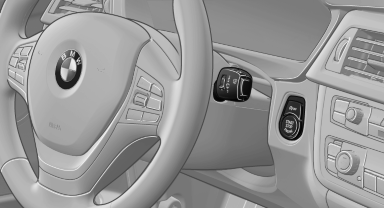
Using the button
 Press the button.
▷ LED comes on: Auto Start Stop function is deactivated.
The engine is started during an automatic engine stop.
The engine can only be stopped or started via the Start/Stop button.
▷ LED goes out: Auto Start Stop function is activated.
Switching off the vehicle during an automatic engine stop
During an automatic engine stop, the vehicle can be switched off permanently, e.g., when leaving it.
1. Press the Start/Stop button. The ignition is switched off. The Auto Start/Stop function is deactivated.
Automatic transmission: the transmission position P is engaged automatically.
2. Set the parking brake.
Engine start as usual via start/stop button.
See also:
Timeshift
Approx. one hour of the program being broadcast on the channel currently being
listened to is stored in a buffer. Prerequisite: the signal must be available.
The stored audio track can be played wi ...
Inserting/removing the snap-in adapter
1. Press button 1 and remove the cover.
2. Insert the snap-in adapter at the front, arrow
1, and press down, arrow 2, until it engages.
To remove the snap-in adapter: press button 1.
Insert ...
Tires
Due to technical factors associated with their
manufacture, tires do not achieve their full traction
potential until after an initial breaking-in period.
Drive conservatively for the first 200 mi ...