
Components of the integrated Owner's Manual
The integrated Owner's Manual consists of three parts, which offer various levels of information or access possibilities.
Quick Reference Guide
Located in the Quick Reference is important information for the operation of the vehicle, the operation of basic vehicle functions or for what to do in the event of a flat tire. This information can also be displayed during driving.
Search by pictures
Information and descriptions based on illustrations can be searched via search by pictures.
This is helpful, for example, if the description of an outfitting package that cannot be named is needed.
Owner's Manual
Information and descriptions can be searched by direct entry of a search term via the index.
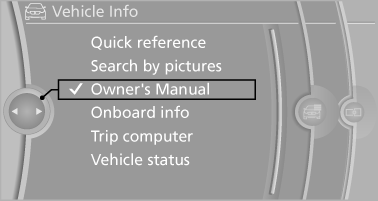
Select components
1.
 Press the button.
2. Turn the controller: open "Vehicle Info".
3. Press the controller.
4. Selecting desired range:
▷ "Quick reference"
▷ "Search by pictures"
▷ "Owner's Manual"
See also:
Replacing the battery
1. Take the integrated key out of the remote
control.
2. Push in the catch with the key, arrow 1.
3. Remove the cover of the battery compartment;
see arrow 2.
4. Insert a battery of the same ty ...
Stowing cargo
▷ Heavy cargo: stow as far forward and as low
as possible, ideally directly behind the cargo
area separating wall.
▷ Very heavy cargo: when the rear seat is not
occupied, secure e ...
Assistance functions
Functional requirement
▷ The backup camera is switched on.
▷ The trunk lid is fully closed.
Pathway lines
Pathway lines
▷ Can be shown in the backup camera image
when in tra ...