
General information
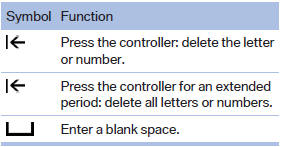
1. Turn the controller: select letters or numbers.
2. Select additional letters or numbers if needed.
3. "OK": confirm the entry.
See also:
Environmental conditions
▷ Say the commands, numbers, and letters
smoothly and with normal volume, emphasis,
and speed.
▷ Always say commands in the language of
the system. The language for the mobile
pho ...
Operating from the inside
Via the button for the central locking system.
If the vehicle has been locked from inside, the
fuel filler flap remains unlocked.
If an accident of a certain severity occurs, the
central locki ...
Vehicle information
Owner's Manual
Computer
Vehicle
...